Sumant - Game Programmer

Hi, I'm Sumant
Game Programmer & Technical Designer
A passionate Unreal Engine developer specializing in Blueprint scripting and adapting C++, character mechanics, and immersive game systems. I build everything from advanced animations and weapon systems to complex AI and GAS implementations, always focused on delivering polished and engaging games
Game Projects

Hack N Slash
🛠 UE5 🛠 Blueprint ⏱ 4 Weeks
Spirit Brawl
🛠 UE5 🛠 Blueprint ⏱ 6 Month
Character Mechanics
🛠 UE5 🛠 Blueprint ⏱ 2 Weeks
Weapon System
🛠 UE5 🛠 Blueprint ⏱ 1 Week
Multiplayer Shooter
🛠 UE5 🛠 Blueprint ⏱ 3 Month


System Exploration

Sound Redesign - Lich King
🛠 Adobe Audition ⏱ 1 Week
Scout Animation Cycle
🛠 Maya ⏱ 4 Weeks
Squirrel Jump
🛠 Maya ⏱ 1 Week
Environment Design
🛠 UE5 ⏱ 4 Week
Cinematic -Chosen By The Ocean
🛠 UE5 ⏱ 12 Week


About Me
I’m a gameplay programmer specializing in Unreal Engine, with a strong foundation in both Blueprint and C++. I build immersive combat systems, responsive animations, and modular gameplay mechanics that feel polished and engaging.
When I first arrived in Australia, I struggled with confidence and adapting to a new environment. My first year was about finding my footing. But by the second year, I gained clarity and momentum. In my final year, I stepped up as team leader, driving both game design and Unreal Engine development.
That experience sharpened my technical and creative skills—and taught me how to lead, collaborate, and deliver under pressure. Today, I’m confident, systems-oriented, and ready to contribute meaningfully to any game development team.
System Exploration
In game development, creating a game alone isn’t enough — understanding how other aspects like animation, sound design, and modeling work is equally important. These small projects were designed to help me explore and learn how different systems function in a team environment, giving me a well-rounded understanding of collaborative game development.
Cinematic - Chosen by The Ocean
Chosen by the Ocean is a real-time cinematic developed in Unreal Engine, showcasing MetaHuman character performance. My work included animation retargeting from Mixamo, facial performance capture and lip-sync using Live Link mocap, animation curve refinement, and implementation of Animation Blueprints with hand IK for accurate character interaction.
Environment Design
- Created a cozy, stylized environment using Unreal Engine.
- Built everything from scratch using free assets from the Unreal Marketplace.
- Set up lighting entirely within Unreal Engine for mood and atmosphere.
- Implemented a river using Unreal’s new water plugin.
Sound Resign - Lich King
For this sound design project, I created an immersive audio experience using:Audio Sourcing: Sourced over 50 audio clips from various platforms and libraries.
Mixing Techniques: Utilised Adobe Premiere Pro to mix and synchronize audio with visuals effectively.
Sound Quality Optimisation: Focused on achieving professional sound quality through meticulous editing and layering.
This project exemplifies my ability to deliver quality sound design under tight deadlines.
TF2 Scout - Animation
I created fluid walk-and-run animations using Autodesk Maya, focusing on:Natural Movement: Implemented weight distribution, timing, and character dynamics for realistic animations.
Technical Skills: Applied principles of animation to convey emotions and urgency effectively.This project allowed me to apply learned techniques from my coursework and improve my animation skills.
Squirrel Jump
Designed a playful squirrel jump animation in Autodesk Maya, showcasing:Fluid Motion: Created a crouching and leaping sequence that captures the character's agile essence.
Learning Experience: Developed this animation during my first year of college, emphasising the technical and creative challenges faced.
Skills
Programming:
- C++ (functions, control flow, arrays, enums, pointers learning in progress)
- Unreal Engine C++ (gameplay logic, optimization, debugging)Unreal Engine Skills :
- Blueprints & C++ for gameplay systems, animation logic, AI, and multiplayer basics
- Event Dispatchers, Timelines, Interfaces, Gameplay Tags
- Modular AI behaviour, state-driven animation systems
- Niagara VFX integration, UMG UI systems
- Level design, prototyping, interactive props
- Basic replication understanding (ownership, RPCs, GameMode/GameState)Art & Animation Knowledge:
- Keyframe animation, character rigging, modelling workflows (Maya, ZBrush)
- Texture creation basics and sound implementationTools:
- Visual Studio, Git, Premiere Pro, Photoshop.
- Unreal Editor tools (Animation Blueprint, Behavior Trees, Sequencer)
Spirit Brawl
Spirit Brawl is a 2.5D hack-and-slash game I’m building in Unreal Engine 5 using PaperZD. I’ve been adding a lot lately to bring the gameplay closer to what I originally imagined. So far, I’ve implemented light and heavy attack combos, stun and knockdown mechanics, and a dynamic audio manager to make the game feel more alive.There’s also slash VFX that sync perfectly with punch and kick swings and a working enemy spawn system. I’m pretty happy with how it’s coming together.
Story
The game begins with chaos as Shenrei, a dark warlord from the underworld, leads his yokai army to attack a peaceful mountain village. Their target—the sacred temple, home to ancient relics and spiritual energy that protect the land.As flames rise and villagers scatter, a teenage boy—a young temple apprentice—refuses to flee. Armed only with his training staff and unwavering spirit, he stands against Shenrei’s yokai troops to defend the temple and those who remain.This battle marks the beginning of his journey—a fight to protect his home, uncover the truth behind Shenrei’s invasion, and rise as the village’s unexpected hero.
Core Mechanics
1. Fast-Paced Combo Combat
2. Basic Combos (Light / Heavy Attacks)
3. Hit Counter
4. Varied Enemies
5. Boss Fights
Gameplay Architecture & Modular Systems
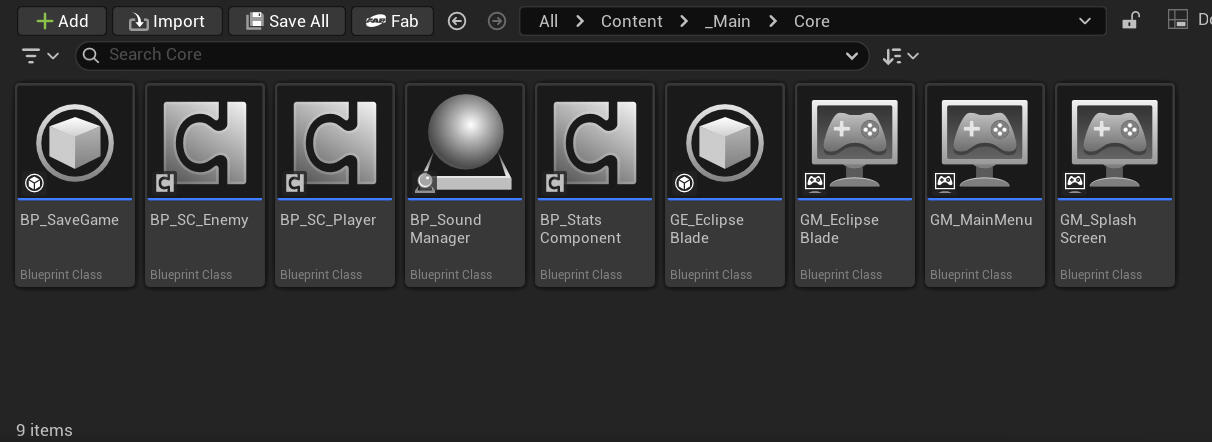
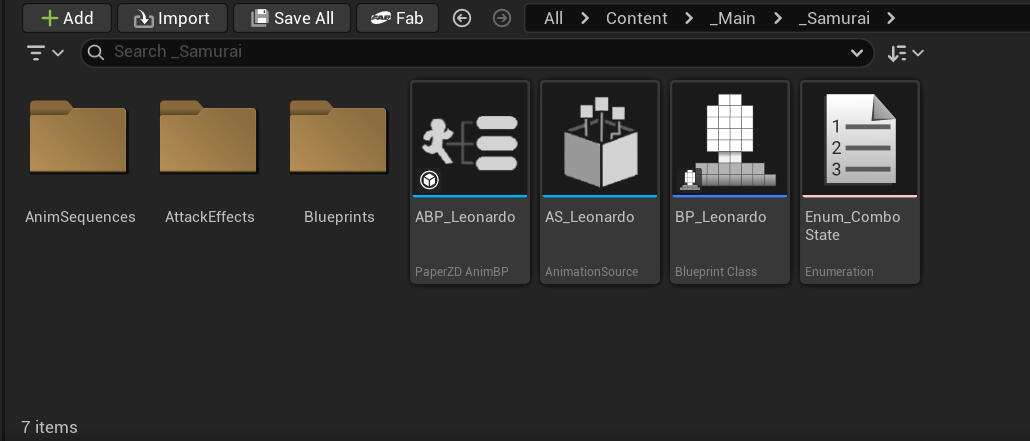
This project uses a component-based gameplay architecture with a clear separation between character behavior and controller logic. Player and AI behavior is handled within character classes, while input and control flow are managed through dedicated controllers. Core gameplay systems such as stats and targeting are implemented as reusable Blueprint Components to keep the character blueprint lightweight. Shared stats logic is extended through specialized child components for player and enemy characters, while the targeting component encapsulates lock-on logic and motion warping functionality independently of the character. PaperZD is used to create smooth animations and attack combos, as shown in the screenshots below.
Screenshots and Blueprint PasteBin

Folder
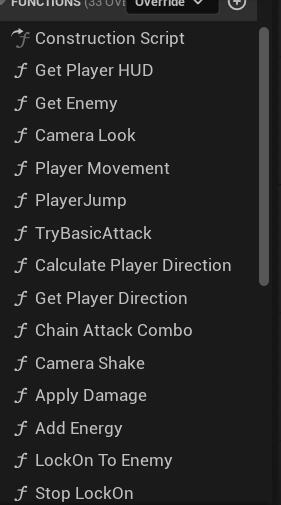
Functions

Player
Links to some of the code is down below :
These examples demonstrate how I keep projects and code neat, modular, and reusable. Core gameplay logic is implemented in functions wherever possible, keeping Event Graphs clean and focused. Components are designed to be reusable across different actors, and systems are structured to show systematic thinking rather than just making things work. You can see how the Enemy Blueprint is designed so that child Blueprints can use and override its logic, making it a fully modular system rather than just a collection of code chunks. Below are some of the key system breakdowns which give more insight into what’s actually happening.
Important System Breakdown
1. Fluid Melee Combo System
This project implements a modular 2D attack combo system in Unreal Engine using the PaperZD plugin. Light and heavy attacks are structured using a dedicated Animation State Machine, where each move in a combo is its own state (e.g., LightStart → LightLight → LightHeavy), forming a decision-tree-like hierarchy.Key Features:- Input Handling via Blueprint Interfaces: Player inputs for light and heavy attacks are sent to the Animation Blueprint through a reusable interface (BPI_ComboRequest), ensuring clean separation between input and animation logic.- Transition Logic: Combos progress based on animation completion and buffered input, allowing precise timing while maintaining responsiveness.- Gameplay Tags for State Management: Tags control input windows and track combo states, keeping code organized and scalable without cluttering the Event Graph.- Reset and Termination: Leaf nodes trigger events to clear combo states and input buffers, and the system automatically resets to idle when no valid input is detected.This hierarchical, modular design allows easy expansion, such as adding medium attacks or branching combo paths, while keeping the system clean, maintainable, and fully reusable across characters.
Team Member / Roles
1. Sumant (Me) - Team Director - Designer - Developer
2. Yuri - Lead Artist - Environment Arist - Character Artist - Concept Artist
3. Cael - Animator
4. Sabrina - UI/UX Artist - Environment Artist
5. Ash - Animator
6. Petra - Animator
Project : Hack N Slash
A third-person 3D action hack-and-slash prototype set within a stylized, atmospheric East Asian courtyard. The project focuses on creating a visceral and responsive combat experience, challenging the player to master fluid, high-mobility swordplay against waves of relentless undead enemies. The core gameplay loop is built on a foundation of skillful evasion, strategic positioning, and a dynamic elemental combo system that provides both visual flair and tactical depth.
Core Mechanics
- Fluid Melee Combo System
- High-Mobility Dodge & Evasion
- Target Lock-On & Motion Warping
- Enemy Health & Damage Number
Gameplay Architecture & Modular Systems
Important System Breakdown
1. Fluid Melee Combo System
- An Integer (ComboCounter) tracks the current stage of the attack chain.
- Anim Notifies on each montage toggle a Boolean (bCanContinueCombo) to create a precise input window for the next attack.
- Successful input increments the counter, which drives a Select node to play the correct subsequent Animation Montage in the sequence.
- A final notify resets the combo if the input window is missed, ensuring a fluid return to idle.
2. Target Lock-On & Motion Warping
- Target Acquisition: A Multi-Sphere Trace is performed to detect all potential targets within the player's forward cone.
- Target Validation: Hits are filtered by checking for the presence of a specific Component (Enemy Stats Comp), ensuring only valid enemy actors can be targeted.
- Optimal Target Selection: A combination of Dot Product (to find the enemy most central to the screen) and a Line Trace (to confirm line-of-sight) is used to select the best target, which is then stored as a variable.
- Attack Warping: Upon attacking a locked-on target, Unreal's Motion Warping system is activated. This dynamically adjusts the root motion of the attack animation, creating a magnetic "lerp" that smoothly aligns the player's position and rotation to guarantee the attack connects with its target.
My Role
1, Game Programmer
2. Technical Designer
Weapon & Inventory System
This system implements a two-weapon loadout with full ammo management, supporting both semi-automatic and automatic firing modes. It allows for smooth weapon switching, state preservation, and multiple firing behaviors.
Core Features
- Two-Weapon Loadout – Player can carry a Rifle (automatic) and Pistol (single-shot), switching anytime with ammo states saved for each.
- Ammo Management – Tracks magazine ammo and reserve ammo separately. Reload pulls from reserve without losing leftover rounds.
- Firing Modes – Hip-fire and Aim-fire, with the Rifle supporting full-auto and the Pistol firing semi-auto.
- Persistence – Ammo counts remain accurate after switching or reloading.
System Breakdown
1. Fluid Movement
- Player movement uses WASD/analog input with velocity and vector length to determine speed.
- “Calculate Direction” node computes movement direction, driving a 9-direction Blendspace for smooth strafing and diagonal animations.
- Anim Blueprint blends animations based on speed and direction, keeping movement fluid and synchronized with character rotation.
- Reloading uses a layered Blendspace, allowing the upper body to play the reload animation while the lower body continues movement.
2. Combat / Shoot
- Each weapon is a separate Weapon Blueprint, added as a Child Actor in the player.
- Shooting uses a line trace to detect hits, triggered on input pressed.
- A cooldown timer (BIsCooldown) controls firing rate, supporting single-shot pistols and automatic rifles.
- On input released, the shoot timer is cleared to stop firing.
- IsSingleShot boolean determines weapon type, which can be modified in the Child Blueprint.
- Ammo and reload mechanics are handled via a separate Component Blueprint, allowing modular management.
- Ammo is saved in character "Temp Ammo Int" when changing weapon so player can retrive when changing back to same weapon.
My Role
- Game Programmer
Character Mechanics
Smooth 3D movement with blended animations, weapon aiming and recoil, ammo pickups, and reloads that play seamlessly while walking.
Core Features
- Movement & Animation – Player moves in a 3D environment with smooth Blendspace animations for walking and idle transitions.
- Combat – Uses a weapon with Aim Offset for targeting and recoil effects. Firing consumes ammo, which can be replenished from ammo boxes placed in the level.
- Reloading – Layer Blend allows reload animations to play while walking. Reload logic works seamlessly with movement and ammo tracking.
System Breakdown
1. Fluid Movement
- Player movement uses WASD/analog input with velocity and vector length to determine speed.
- “Calculate Direction” node computes movement direction, driving a 9-direction Blendspace for smooth strafing and diagonal animations.
- Anim Blueprint blends animations based on speed and direction, keeping movement fluid and synchronized with character rotation.
- Reloading uses a layered Blendspace, allowing the upper body to play the reload animation while the lower body continues movement.
2. Combat / Shoot
- Each weapon is a separate Weapon Blueprint, added as a Child Actor in the player.
- Shooting uses a line trace to detect hits, triggered on input pressed.
- A cooldown timer (BIsCooldown) controls firing rate, supporting single-shot pistols and automatic rifles.
- On input released, the shoot timer is cleared to stop firing.
- IsSingleShot boolean determines weapon type, which can be modified in the Child Blueprint.
- Ammo and reload mechanics are handled via a separate Component Blueprint, allowing modular management.
Multiplayer Shooter
A fast-paced multiplayer shooter supporting up to 4 players per lobby. Features include a functional lobby system, scoreboard tracking, and nametags displayed above each player. Players can interact with the environment through pickup animations for ammo and health, adding a polished, immersive feel. Built with Unreal Engine, emphasizing smooth multiplayer mechanics, networking, and gameplay feedback.
Core Features
- Lobby & Matchmaking – Players can join via text and voice chat lobby, supporting up to 4 players per match.
- Leaderboard & Scoreboard – Tracks player performance in real-time during matches.
- Interactive Pickups & Respawn – Ammo and health pickups with proper animations; players can respawn after being eliminated.
- Player Nametags & Networking – Nametags above player heads for clarity and smooth multiplayer replication.
System Breakdown
1. Host/Join & Lobby
- Host & Join Maps – Separate maps for hosting and joining games; players enter their name in the UI before proceeding.
- Hosting – Host creates a server and triggers server travel to the lobby map.
- Joining – Other players enter the host’s server info and join the lobby map with their name.
- Lobby System – Displays all players; each can press Ready, and once all are ready, the host starts the game.
2. Combat / Shoot
- Each weapon is a separate Weapon Blueprint, added as a Child Actor in the player.
- Shooting uses a line trace to detect hits, triggered on input pressed.
- A cooldown timer (BIsCooldown) controls firing rate, supporting single-shot pistols and automatic rifles.
- On input released, the shoot timer is cleared to stop firing.
- IsSingleShot boolean determines weapon type, which can be modified in the Child Blueprint.
- Ammo and reload mechanics are handled via a separate Component Blueprint, allowing modular management.